Niva Bupa policyholders can access support, policy documents, renewals, and service requests through its helpline, digital portal, mobile app, and branch network without needing to visit a branch first.
Contact Details
Customer Helpline: Call 1860-500-8888 for policy servicing, claims, renewals, and other support requests.
Senior Citizen Support: Write to [email protected] for dedicated assistance with senior citizen policies.
Registered Office: Niva Bupa’s registered office is located at C-98, First Floor, Lajpat Nagar, Part 1, New Delhi 110024.
How to Log In & Access Services
Online Portal: Use Insta Assist with your registered mobile number and One-Time Password to access policy and service options.
Policy Download: Retrieve policy documents online using the mobile number linked to your policy.
Policy Renewal: Renew using your policy number and date of birth after reviewing premium and coverage details.
Mobile App: Use the Niva Bupa app to view policy details, claims, renewals, and service requests.
Finding it hard to manage your health insurance account? With IRDAI promoting fully digital policies, you can access your plan through an e-Insurance account. Niva Bupa supports this with a simple portal and strong customer support, available 24/7. This guide explains how to do it step by step.
Update contact or nominee details and get quick help for complaints or feedback.
Why Should You Use the Niva Bupa Health Insurance Login?
Review, edit, and update details of all enrolled members instantly.
View your coverage details, including sum insured and premium schedule.
Pay your policy premiums online or renew policies without waiting in long queues.
Avail annual health check-ups and book appointments online.
Get access to a host of benefits, like raising claims and tracking them. You also get to locate your nearest network hospital.
Note:IRDAI rules require insurers to protect your personal data. That is why insurance companies use security steps like OTP verification. It ensures only you can access your account.
Talk to an expert today and find the right insurance for you.
What Are the Steps to Niva Bupa Health Insurance Login?
If you are a policyholder, here is a step-by-step process to log in to your Niva Bupa Health account via Insta Assist :
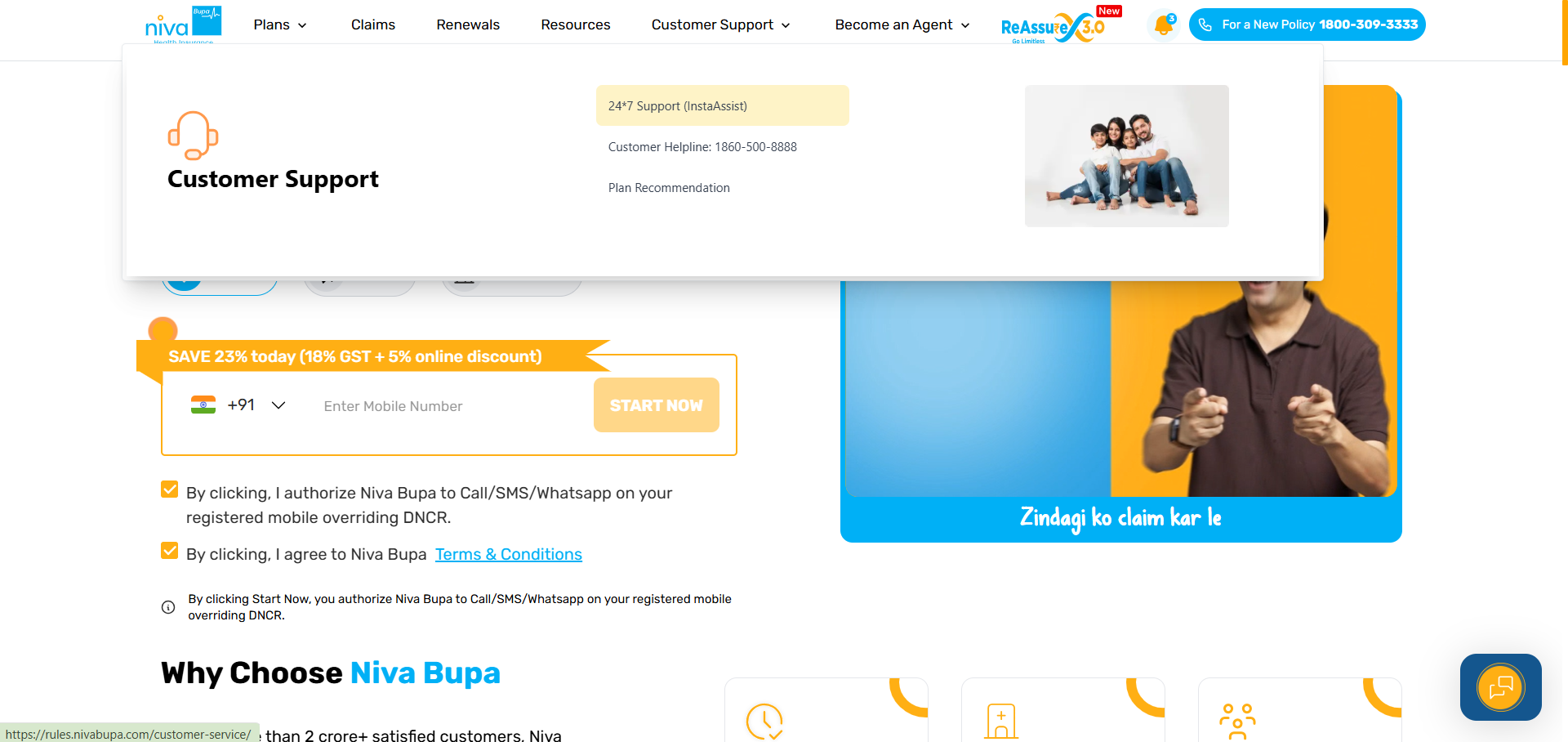
Step 1: Visit the Niva Bupa website and click “Customer Support” at the top right of the homepage, and click “Insta Assist” from the drop-down options.
Step 2: Search your query using keywords or select the relevant service category.
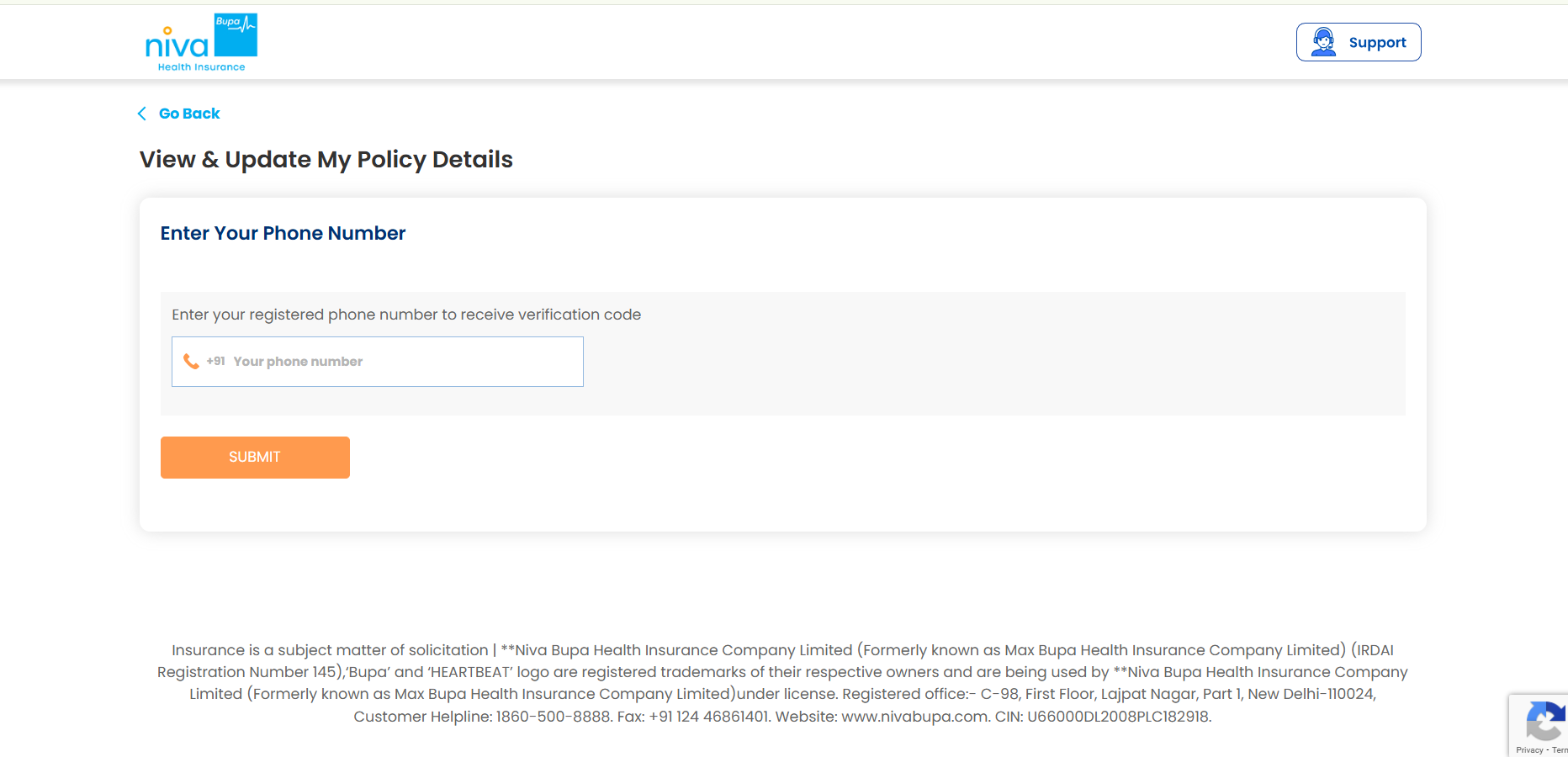
Step 3: Enter your registered mobile number and complete OTP authentication.
Step 4: After verification, all policies linked to your mobile number will appear.
For example, if you want to update policy details, you can verify your identity and go ahead with the process.
Note: In case you want to renew your health policy or file a claim, click on “Support” at the top-right corner and go ahead with the verification process.
Covered for Hospital Bills. Covered for Life?
Because your family needs more than hospital cover.
At Ditto, we’ve assisted over 12,00,000 customers choose the right insurance policy. Why customers like Pallavi love us:
100% Free Consultation
No Spam. No Sales Pressure.
Rated 4.9/5 on Google Reviews by 30,000+ Happy Customers
Backed by Zerodha
Dedicated Claim Support Team
Compare Plans and Premiums with a Trusted Insurance Advisor
Confused about the right insurance? Speak to Ditto’s certified advisors for free, unbiased guidance. Book your call now or chat with us on WhatsApp. Slots fill up fast!
Ditto’s Take on Niva Bupa Health Insurance Contact and Login
Always use the official Niva Bupa website and a secure device to protect your details. Do not share your OTP with anyone. Once you finish checking your policy or claims, log out for safety.
However, there are several considerations to keep in mind when proceeding with your policy application process or registering for a policy. Niva Bupa is one of our partner insurance companies, and you can get in touch with us for further assistance (if you bought your policy through us).
Frequently Asked Questions
How can I contact Niva Bupa Health Insurance customer care?
Niva Bupa policyholders can contact customer support at 1860-500-8888 for policy servicing, claims, renewals, and other queries. The insurer also provides Insta Assist for online service requests and a branch network for offline assistance. Senior citizens can write to [email protected] for priority assistance. For account-specific requests, keep your policy details and registered mobile number accessible before contacting customer support.
How do I log in to my Niva Bupa health insurance account?
You can access your Niva Bupa policy through the Insta Assist self-service platform. Visit the official customer service portal and enter your registered mobile number to receive a One-Time Password. After verification, you can access policies linked to that number and select the required service. Insta Assist supports policy-related requests, claims, renewals, complaint registration, and service request tracking through the online portal.
Can I access my Niva Bupa policy through the mobile app?
Yes. The Niva Bupa Health App allows policyholders to access policy information using their registered mobile number. First-time users enter the mobile number, verify the six-digit One-Time Password, provide their date of birth, and create an M-PIN or enable fingerprint access. The app displays policy details after issuance, provided the mobile number is correctly linked to an active Niva Bupa policy.
What can I do through the Niva Bupa customer portal?
Niva Bupa’s Insta Assist portal provides access to several policy servicing functions. Policyholders can use it for policy-related requests, claims, renewals, complaints, and tracking existing service requests. The portal also provides access to the hospital locator, branch locator, grievance redressal section, and support resources. Using the self-service portal can be convenient when you need policy assistance without visiting a Niva Bupa branch.
How can I download my Niva Bupa health insurance policy?
You can access and download your Niva Bupa policy documents through its digital customer services. Niva Bupa’s policy servicing tools provide access to policy copies, health cards, premium receipts, and policy details after authentication. Use the mobile number registered with your policy when accessing the digital platform. If you cannot retrieve the document online, contact customer support at 1860-500-8888 for assistance with your policy records.
How can I track my Niva Bupa health insurance claim?
Niva Bupa provides online claim-related services through its customer support platform. Policyholders can access the claims section after verifying their registered details and use the available tools to check claim information. Keep your policy number, claim details, and registered mobile number available when tracking a claim. If the online service does not resolve your query, contact Niva Bupa customer support at 1860-500-8888 for further assistance.
How can I find a Niva Bupa network hospital?
Niva Bupa provides a hospital locator through its customer service platform to help policyholders search for network hospitals. The insurer currently has 10,000+ network hospitals, meeting Ditto’s 10,000+ benchmark for cashless network reach. However, network arrangements can change. Always verify that your preferred hospital is currently empaneled before planned hospitalization instead of relying only on the insurer’s overall hospital network count.